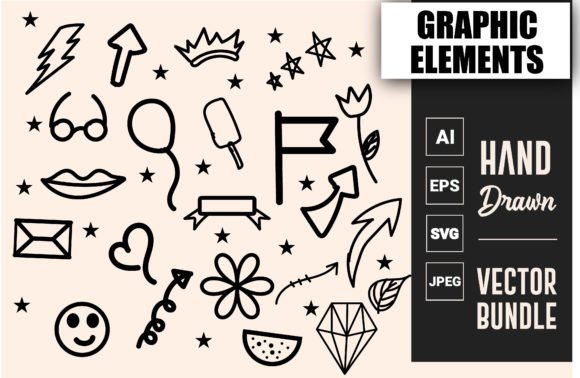
Doodles Decorative Elements: A Creative Tool for Designers and Hobbyists
In the world of digital design, having access to high-quality decorative elements can make all the difference in bringing a project to life. Doodles Decorative Elements is an instant download resource that offers users a versatile set of artistic assets tailored for both professional and personal use. Whether you're designing for print or digital platforms, these files provide a creative edge with their unique style and adaptability.
What Are Doodles Decorative Elements?
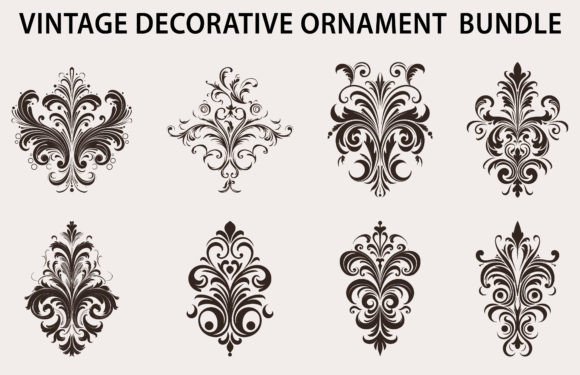
Doodles Decorative Elements are stylized graphic components used to enhance visual compositions. These include whimsical lines, shapes, flourishes, and patterns often associated with hand-drawn aesthetics. They are ideal for adding charm, character, and a personalized touch to a wide range of projects such as invitations, social media graphics, packaging designs, and more.
Key Features and Formats Included
When you purchase this product, you will receive one zip file containing four different file formats:
- .ai (Adobe Illustrator): Perfect for those who prefer working in vector-based software and want to edit individual elements easily.
- .eps (Encapsulated PostScript): A widely compatible vector format suitable for print and commercial use.
- .jpeg: Ideal for quick image insertion into web content, presentations, or any platform requiring a raster image.
- .svg (Scalable Vector Graphics): Great for web designers due to its scalability without loss of quality and support for animation.
Note that mockups are not included in the package. This means the focus is on the actual doodle elements rather than pre-designed templates, giving you full creative control over how they’re applied.
Who Can Benefit from Using Doodles Decorative Elements?
This resource is suited for a broad audience including:
- Creative professionals, such as graphic designers and illustrators, who need customizable elements for client projects.
- Business owners looking to elevate branding materials like logos, brochures, or website headers.
- Hobbyists and crafters who enjoy creating handmade cards, scrapbooks, or DIY home decor items.
- Online creators, including bloggers, YouTubers, and Instagrammers, aiming to personalize their content visuals.
The flexibility of the included file types ensures that whether you're using Adobe Illustrator or Silhouette Studio, there's a format to suit your workflow.
Software Compatibility
Doodles Decorative Elements are compatible with several popular design tools:
- Adobe Illustrator
- Adobe Photoshop
- Inkscape
- Silhouette Studio
- And many other vector and raster editing programs
This compatibility makes it easy for users across various experience levels to integrate doodles into their work seamlessly. For example, if you're crafting a digital greeting card in Photoshop, you can import JPEG versions for immediate use. Meanwhile, if you're preparing a scalable design for a business logo, the .ai or .svg files offer precision and flexibility.
Real-World Applications of Doodles Decorative Elements
Doodles aren't just for fun—they serve practical purposes in many design scenarios. Here are some examples where they can be particularly useful:
1. Enhancing Social Media Content
With brands constantly vying for attention online, adding a unique visual flair is essential. Doodles can help break up text-heavy posts or add personality to pinned tweets and Facebook banners. Their hand-drawn appearance gives off a warm, approachable vibe—perfect for lifestyle brands, educators, or small businesses.
2. Personalizing Stationery and Invitations
Wedding planners, event designers, and stationery artists often rely on decorative elements to create memorable designs. Doodles can be layered behind text or incorporated as borders to add elegance and creativity to save-the-date cards, thank-you notes, or party invites.
3. Crafting Printables and Digital Downloads
If you sell digital products like planners, worksheets, or art prints, doodles can be used to frame pages or highlight key sections. The vector formats allow for easy resizing and repositioning, ensuring your final product looks sharp on any device or paper size.
4. Adding Interest to Packaging Designs
Whether you're designing labels for homemade jams or branding for a new line of eco-friendly products, doodles can give your packaging a distinctive look. They’re especially effective when paired with minimalist layouts, as they introduce visual interest without overwhelming the design.
Evaluating Suitability for Your Needs
Before purchasing, consider what type of projects you typically work on and which file formats you're most comfortable using. If you're already familiar with vector-based design tools like Adobe Illustrator or Inkscape, then the .ai and .svg files will likely be the most valuable to you. On the other hand, if you're focused on quick edits or sharing on the web, the .jpeg format provides convenience and ease of use.
Also think about the aesthetic you want to achieve. Doodles are best suited for designs that embrace a casual, artistic, or hand-crafted feel. If your project requires a more formal or modern look, you might find that these elements don’t align perfectly with your vision.
Strengths and Limitations
One major strength of Doodles Decorative Elements is their versatility. With multiple file formats available, you can choose the one that fits your specific needs. Additionally, the hand-drawn nature of the doodles adds warmth and originality to your designs, helping them stand out in a crowded market.
However, there are also some considerations to keep in mind. Since the package does not include mockups, you’ll need to apply the elements yourself, which may require some basic design skills. Also, while the elements are decorative and visually appealing, they may not always serve as standalone designs. It’s important to view them as supplementary assets rather than primary design features.
How to Get Started
Once you've downloaded the zip file, extract its contents and review each format to see which works best for your intended use. If you're unsure, experimenting with the .svg or .ai files in your preferred software is a great way to explore possibilities. Start by importing a doodle into a new canvas and playing around with colors, sizes, and layering techniques.
For those who are less experienced with design software, online tools that support SVG imports can be a helpful starting point. Many free editors and template builders now accept these formats, making it easier than ever to incorporate doodles into your work.
Tips for Effective Use
- Layer wisely: Use doodles as accents or background textures to avoid cluttering your design.
- Experiment with color: Most doodles are provided in black or grayscale, but you can recolor them to match your brand or theme.
- Respect licensing: Make sure to check the usage rights for commercial applications before incorporating doodles into your work.
- Combine with typography: Pair doodles with elegant fonts or handwritten styles to maintain consistency in the overall design.
Conclusion
Doodles Decorative Elements offer a valuable addition to any designer’s toolkit. Their availability in multiple formats ensures accessibility and adaptability, while their artistic appeal helps bring visual projects to life. Whether you're a seasoned professional or just starting out, these elements can help you express your creativity more effectively. As with any design asset, it's important to evaluate how well they fit your goals and to use them in a way that enhances rather than distracts from your message.